February 2, 2020
Next.js + Redux without disabling prerendering (Updated)
Integrating redux to your server-side rendered application in nextjs while preserving prerendering

I had written a post about integrating Nextjs with Redux a few months back, but it had one downside. Static prerendering was not possible using that method even though you didn’t use getInitialProps in the page components.
Here’s a link to the previous post, if you are interested in having a look at it.
Static prerendering allows you to generate files in build time rather than running a server. So faster page load, since there are static files and can be cached at CDN.
The difference between the early version is that we will be using the Redux higher-order component not in the _app.js file but on the page components that require redux. For achieving this, there are few tweaks made to the redux higher-order component.
Let’s follow through the instruction by setting up a new project.
 npm init -y
 npm install react react-dom next redux react-redux react-thunk

 # Optional package
 npm install redux-devtools-extension
Configuring Redux in Nextjs
This wrapper file is taken from next.js Github repository
// /lib/with-redux-store.js
import React from 'react'
import { Provider } from 'react-redux'
import initializeStore from '../src/store'
import App from 'next/app'

export const withRedux = (PageComponent, { ssr = true } = {}) => {
	const WithRedux = ({ initialReduxState, ...props }) => {
		const store = getOrInitializeStore(initialReduxState)
		return (
			<Provider store={store}>
				<PageComponent {...props} />
			</Provider>
		)
	}

	// Make sure people don't use this HOC on _app.js level
	if (process.env.NODE_ENV !== 'production') {
		const isAppHoc = PageComponent === App || PageComponent.prototype instanceof App
		if (isAppHoc) {
			throw new Error('The withRedux HOC only works with PageComponents')
		}
	}

	// Set the correct displayName in development
	if (process.env.NODE_ENV !== 'production') {
		const displayName = PageComponent.displayName || PageComponent.name || 'Component'

		WithRedux.displayName = `withRedux(${displayName})`
	}

	if (ssr || PageComponent.getInitialProps) {
		WithRedux.getInitialProps = async (context) => {
			// Get or Create the store with `undefined` as initialState
			// This allows you to set a custom default initialState
			const reduxStore = getOrInitializeStore()

			// Provide the store to getInitialProps of pages
			context.reduxStore = reduxStore

			// Run getInitialProps from HOCed PageComponent
			const pageProps =
				typeof PageComponent.getInitialProps === 'function' ? await PageComponent.getInitialProps(context) : {}

			// Pass props to PageComponent
			return {
				...pageProps,
				initialReduxState: reduxStore.getState(),
			}
		}
	}

	return WithRedux
}

let reduxStore
const getOrInitializeStore = (initialState) => {
	// Always make a new store if server, otherwise state is shared between requests
	if (typeof window === 'undefined') {
		return initializeStore(initialState)
	}

	// Create store if unavailable on the client and set it on the window object
	if (!reduxStore) {
		reduxStore = initializeStore(initialState)
	}

	return reduxStore
}
You can use the above snippet at each page that requires a connection to the redux store. But a better way to achieve this would be to wrapping Redux HOC with a common Layout component, which will a wrapper around all the pages.
We will be wrapping the Layout component in the _app.js file, which will be used across all the pages.
// \src/components/Layout.js
import React from 'react'
import { withRedux } from '../../lib/with-redux-store'

function Layout({ children }) {
	return <div>{children}</div>
}

export default withRedux(Layout)
// \pages/_app.js
import App from 'next/app'
import React from 'react'
import Layout from '../src/components/Layout'
class MyApp extends App {
render() {
const { Component, pageProps } = this.props
return (
<Layout>
<Component {...pageProps} />
</Layout>
)
}
}
export default MyAppIt allows keeping the state when navigating between pages as it wraps the Layout component, which will be available on all the pages with withReduxStore higher-order function.
Unlike in a single-page application, we will return the initialize store function instead of the store itself.
// /src/store.js
import { createStore, applyMiddleware } from "redux";
import { composeWithDevTools } from "redux-devtools-extension";
import thunk from "redux-thunk";
import rootReducer from "../src/reducers";

export function initializeStore(initialState = {}) {
 return createStore(
  rootReducer,
  initialState,
  composeWithDevTools(applyMiddleware(thunk))
 );
Now all the components can have access to the redux store using connect function from react-redux.
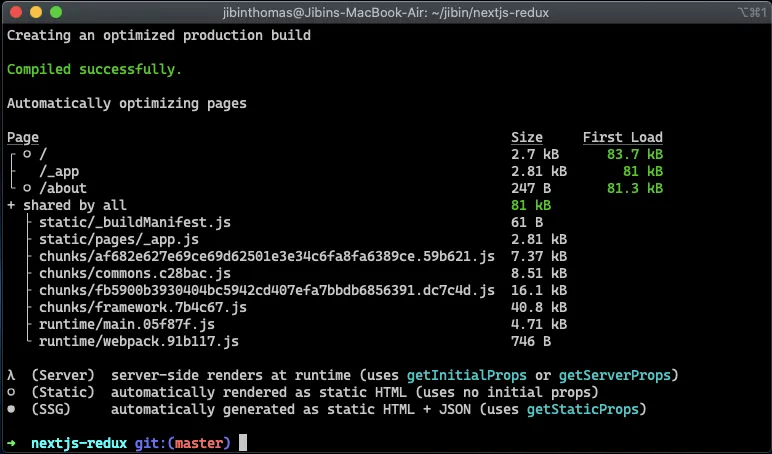
From the above snippet, you can see that we were able to generate static pages of / and /about when using redux wrapper in the Layout component.
Source code
Here’s the source code if you want to try it out in your machine.
cd next-redux-example
npm install
npm run dev